
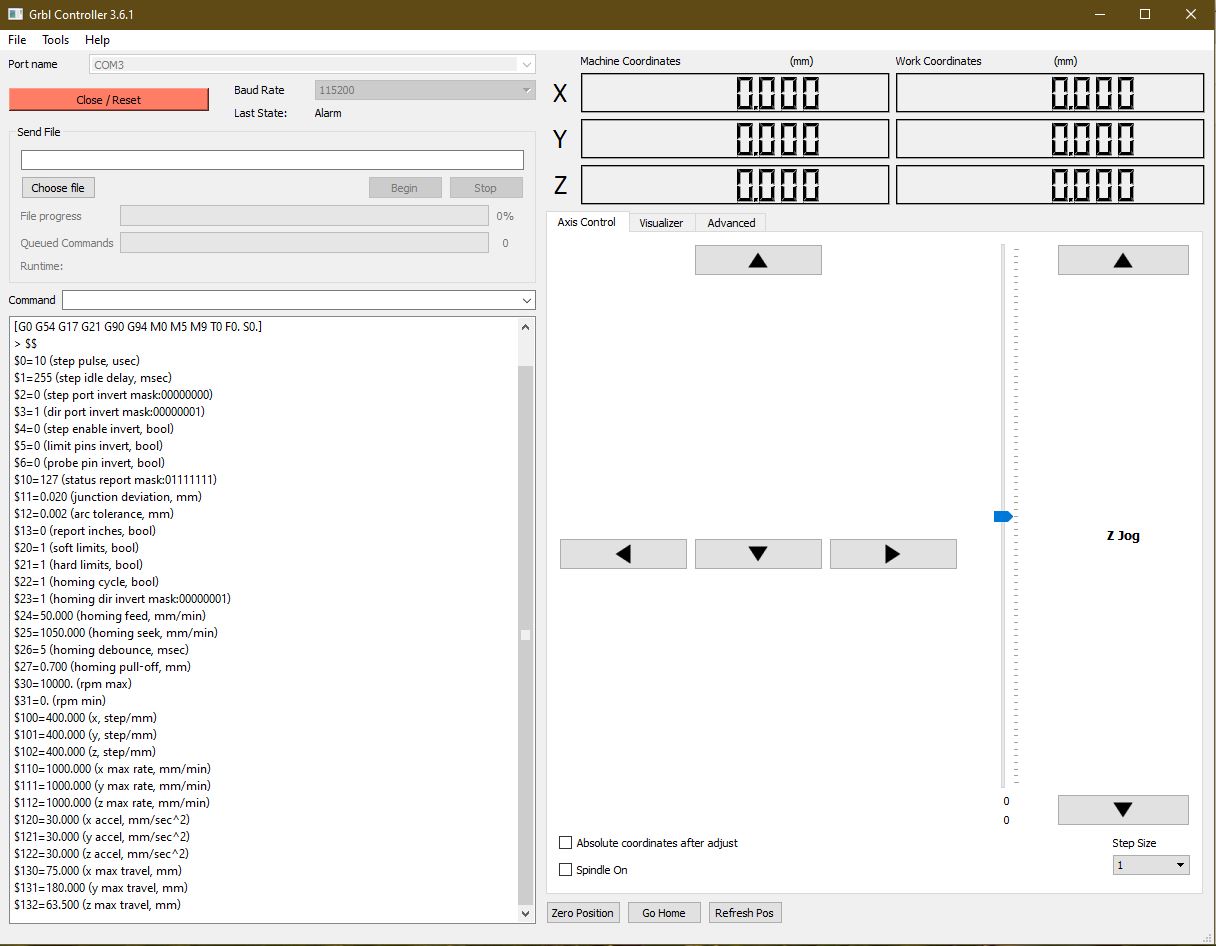
GRBL Toggle Feature
1. Open Grbl Controller. Locate and install from "Optional files" in your Ghost Gunner folder.
2. With the machine USB cable connected, choose your machine's port (usually named COM followed by a number), select 115200 under Baud Rate, then click open.
Note | The machine will give you some information on certain settings.
3. Enter $H on the command line and press enter. The machine will home, and stay in the homed position.
4. Enter G90 G00 X-40 Y-80 and then press enter. The machine will position itself near the center and the T-slot plate will drop to be 40mm from the bottom.
5. Enter Z-20 press enter. The spindle will come forward 20mm.
6. Select the Axis control tab on the right side of the window. You can modify the step size so that with every click it will move that amount of millimeters in the direction you select.
7. Select 1 on the Step Size for now, until you see how the machine moves with each arrow.
Now you can move the machine using the arrows, feel free to change the step size, but be careful not to crash the spindle on the t-slot plate.
Caution | If you attempt to move beyond the machine's work area, you will get a soft limit error and you will need to “close/reset” and start over.
Comments
2 comments
How can I get the spindle to run using this program? I've tried setting rpm limits and using the check box for spindle on.
Command M3 will turn on the spindle.
You can then enter S50000 so the spindle spins at 5000 RPM.
Command M5 will shut the spindle down.
Please sign in to leave a comment.